To optimize a local business in Pakistan, align an eligible Google Business Profile and accurate business details with useful local website pages, genuine reviews and citations, a working mobile enquiry route and outcome tracking. The correct profile setup depends on whether customers visit you, you visit them, or both. Start with eligibility and accuracy, then improve discovery and enquiries; no checklist guarantees a particular Maps position.
What does local business optimization include?
Local business optimization here means local SEO: helping relevant customers discover and assess your business through Search, Maps and your website. It includes trustworthy contact and location information, pages that explain what you actually offer, and an easy way to enquire. For background on the opportunity for smaller firms, see Expando’s local SEO guide for Karachi businesses.
Google describes local results mainly in terms of relevance, distance and popularity/prominence. You can improve information and customer usefulness, but selecting more service areas does not remove distance from the calculation. Google also says there is no way to request or pay for a better organic local ranking.
Step 1: Confirm eligibility, locations and profile ownership
Before editing a Google Business Profile (GBP), confirm that the business qualifies and that the right person controls the existing listing. Google generally requires in-person customer contact during stated hours, with specified exceptions. Online-only businesses are listed among the ineligible examples.
|
Business type |
Next eligibility check |
Address visibility |
Source |
|
Storefront |
Customers visit a qualifying real location |
Show eligible customer-facing address |
|
|
Service-area |
Business visits/delivers to customers |
Remove address if not serving customers there |
|
|
Hybrid |
Serves customers on-site and travels to them |
Eligible storefront address + genuine area |
|
|
Several real locations |
Each location must qualify; check access |
Assess each genuine location separately |
|
|
Online-only |
Generally ineligible; check specific exceptions |
Do not invent a Maps location |
Use the real operating model, not the model that seems easiest to rank. A repair business serving customers at their homes must follow service-area rules; Google says to remove the address from the profile if customers are not served there. A genuine customer-facing location needs to meet storefront requirements.
Search for the business’s existing profile before creating another. Confirm owner or authorized manager access, and resolve an access problem or duplicate identity rather than starting again with a competing listing. Google’s verification guide explains claiming an existing business and using the methods offered for that profile.
Illustrative Pakistan setups: a customer-facing Karachi clinic checks its actual reception location and appointment route; a Lahore home-repair service checks its genuine coverage and address visibility; an Islamabad business checks whether a staffed branch qualifies before creating a branch profile. These are setup examples, not Expando client cases or city-specific ranking rules.
Completion check: The owner can identify the correct profile, its legitimate location/service model and who has authorized access. Any eligibility or duplicate-profile question has a named person responsible for resolving it.
Step 2: Correct and complete your Google Business Profile
Make the profile match the real business customers deal with. Use the actual business name, an accurate category, correct phone and website, and the appropriate address or service area. Keep regular and special hours accurate, including temporary changes that affect whether someone can visit or reach you.
Use the name recognized on real-world branding rather than adding a string of city and service keywords. Choose categories that describe the core business; use relevant fields for services instead of putting every offering into the name. Mailboxes and unstaffed virtual offices are not substitutes for a qualifying location.
Add authentic photos that help customers recognize the business or understand the service. Check available services, attributes and contact features in the actual account; availability can depend on category, region and account. Google recommends complete information and useful photos, but that is not evidence that a particular posting schedule or geotagged image creates a standalone ranking boost.
Google determines the available verification methods. Follow the options shown rather than assuming every Pakistani business will receive the same postcard, phone or video process. Keep ownership with the business and give an agency or colleague authorized management access where appropriate.
Completion check: Compare the public-facing profile with a master record of the business details. Confirm the name, hours, contact destination, coverage and address visibility, along with verified authorized access where available.
Step 3: Research local searches and map them to pages
Start with real services and the locations the business genuinely serves, then test how customers search for them. Use enquiry language, Search Console queries, available GBP search terms and searches from relevant locations to develop a small list. Inspect the result types and your existing pages before deciding a new page is needed.
The following examples are hypothetical query hypotheses, not validated keywords or search-volume evidence. Each row assumes the stated service or branch actually exists.
|
Illustrative search hypothesis |
Truthful destination |
Reason / check |
|
Clinic appointment in Karachi |
Real clinic/service page |
Confirm actual service, address and booking route |
|
Home repair service in Lahore |
Genuine service-area page |
Explain real coverage; imply no public office |
|
Business service at an Islamabad branch |
Actual branch page |
Verify staffed branch and branch-specific details |
Record the query’s intent, the page already covering it and the reason for creating or improving that destination. If two phrases ask for the same service and the same page type ranks, one strong page may answer both. A different spelling or neighbourhood name alone is not enough reason to create another page.
English, Urdu and Roman Urdu are research options. Check the language used in actual enquiries and search data before adapting wording; do not automatically build separate translated pages for every variation. Confirm that any translated content helps the intended customer and can be maintained accurately.
Completion check: You have a short query-to-page map tied to a real footprint, with existing URLs, proposed changes and a clear reason for each new page.
Step 4: Improve genuine location and service pages
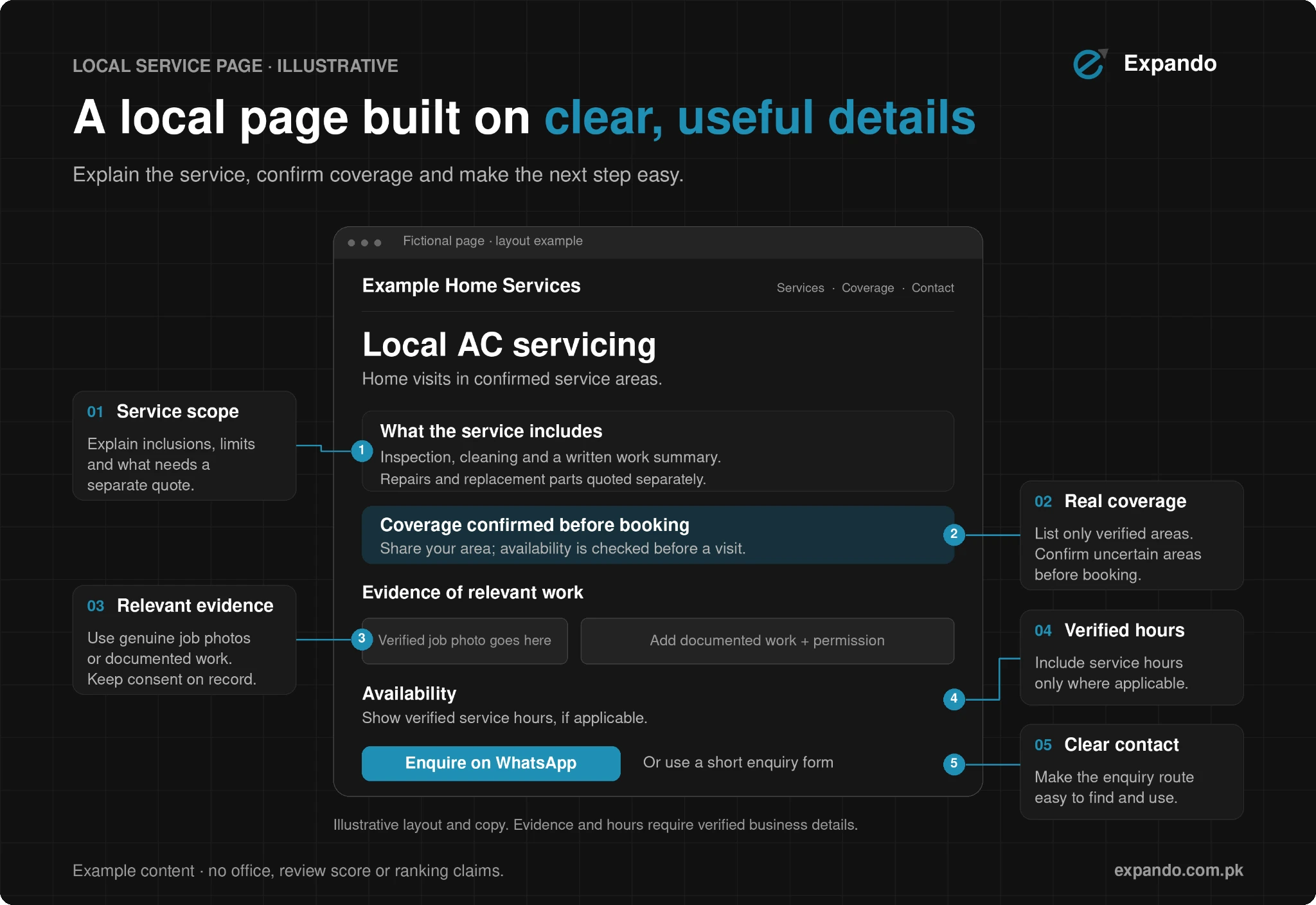
Build a page that helps a customer decide whether the business can meet their need and how to contact the right team. A physical branch page should describe a real branch; a service-area page should explain genuine coverage without implying an office there. Useful differences come from the service and customer situation, not a swapped city name.
Include the actual service scope, relevant process, truthful availability or coverage, contact route and local evidence where you have it. A genuine branch might show access details and its own hours. A home-service page might explain how an appointment is arranged and which areas the team can actually attend. Do not invent testimonials, project photos, locations or response times to make a page appear local.
Use a descriptive title and main heading, readable body text, relevant internal links and a clear path from service pages to contact information. Check that useful pages can be reached through the site and that essential information is available as text. Repeated city pages that funnel users to a generic destination can fall under Google’s doorway-abuse policy.
If LocalBusiness structured data fits the page, use truthful facts that match visible information and Google’s current requirements. Its documented rich-result requirements include a physical address; do not invent one or expose a private home address merely to fill a field. Have a specialist assess the fit for a hidden-address service business. Structured data does not guarantee a rich result or Maps ranking.
Completion check: A customer can understand the service, genuine location/coverage and next step on the page. The business owner has confirmed location claims and contact details before publication.
Step 5: Audit citations and request genuine reviews
A citation is a mention or listing of your business details on another site. Maintain one master record for NAP: name, address and phone plus the website, hours and rules for address visibility. Audit existing listings for wrong phone numbers, outdated addresses, duplicate identities and misleading coverage before adding more.
Prioritize maintained local or industry sources that customers might actually use. Keep a log of the listing URL, issue, owner and correction status. A punctuation difference is not proof of a ranking penalty, and a large submission count is not a substitute for accurate, useful listings. Avoid irrelevant directories and paid link schemes.
Ask genuine customers for an honest review through an official review link or QR code. Google’s guidance allows reminders and encourages helpful replies; its policies prohibit incentives and selective positive-only solicitation.
Do not dictate keywords, request a required rating, pressure someone on the premises or impose staff review quotas.
Neutral request example: “Thank you for choosing us. If you would like to share your experience, you can leave an honest review here: [official review link]. Your feedback helps us understand what worked and what we can improve.” Replace the placeholder with the business’s actual official link.
Respond professionally without disclosing private customer information. If a concern needs account details, move that conversation to an appropriate private contact route. Completion means corrected material listing errors and a documented, neutral review-request process not an arbitrary number of new ratings.
Step 6: Make mobile enquiries easy and track the outcome
Test what happens after a customer finds you. On a real mobile screen, check that service and coverage information is readable, the page loads usefully and the main contact route works. Tap the call button, submit a test form or follow the advertised WhatsApp/booking path, then confirm the right person receives the enquiry.
Keep forms short enough for the task and show hours or expected availability accurately. Give one person responsibility for monitoring each route. A website WhatsApp button is a website contact option; do not assume every GBP account has a universal native messaging feature.
Build a baseline from four sources with distinct roles: GBP performance for profile interactions, Search Console for search visibility and queries, GA4 for configured website events, and a lead log or CRM for conversations, qualification and sales. Google defines the GBP calls metric as call-button clicks, while directions records requests not verified shop visits. Only applicable metrics appear.
A practical lead log records date, source where known, enquiry ID, requested service/location, qualification, outcome and owner. Deduplicate the same person contacting through several routes where possible. A contact click is not an actual conversation, and an actual conversation is not automatically a qualified lead or closed sale.
If external profile links use consistent UTM campaign tags, check their website reporting after configuration. These tags can help campaign analysis; they do not make Search Console a conversion-tracking system. Test the route and record unknown sources honestly rather than assigning every direct enquiry to local SEO.
Compare consistent periods and note changes such as a category correction, new page, holiday hours or a campaign. Local positions vary by query and searcher location; the owner’s phone is not a citywide ranking measure. A grid tool samples chosen locations and does not itself improve rank. Completion means working contact paths, a dated baseline and a report of qualified outcomes.
Pakistan local business optimization checklist
Work through this checklist in dependency order. The revisit timings are a practical operating suggestion, not Google ranking requirements. Fix ownership and accuracy before expanding pages or judging performance.
|
Priority / task |
Responsible role |
Completion evidence |
When to revisit |
|
1. Footprint + ownership |
Owner / authorized manager |
Eligible model; correct profile/access |
Before setup; after location/ownership changes |
|
2. Profile accuracy |
Branch/profile manager |
Master details match public profile |
After changes; before special hours |
|
3. Queries + useful pages |
Owner + SEO/content lead |
Reasoned query map; approved pages |
On service/coverage changes; periodic review |
|
4. Citations + reviews |
Listing/customer-service owner |
Material errors fixed; neutral request process |
After detail changes; routine monitoring |
|
5. Mobile contacts |
Web + enquiry owner |
Test call/form/WhatsApp received |
After site/contact changes; periodic test |
|
6. Outcomes + baseline |
Marketing + sales owner |
Dated report; qualified-lead log |
Agreed monthly review; annotate major changes |
Common mistakes that weaken local visibility
Inaccurate names and locations create avoidable confusion and can conflict with profile rules. Resolve ineligible or duplicate profiles instead of creating listings for every target neighbourhood. Copying the same page for many cities does not establish a genuine local service or branch.
Bought reviews, positive-only requests and irrelevant directory submissions can damage the quality of the information you are building. Avoid presenting posting frequency, map embeds, image metadata or repeated city keywords as guaranteed ranking tricks. Google’s core local guidance emphasizes accurate information and relevance, distance and prominence.
A visible profile can still send customers to a broken form or unmonitored phone. Check lead quality and final outcomes before celebrating clicks as revenue, and document what changed before attributing a business improvement to one SEO task.
Fix the foundation, then maintain it
Start with the eligible business setup, accurate information and working enquiry paths, then maintain useful pages and a genuine reputation. Request a free local SEO audit from Expando to discuss profile, website and tracking priorities, or explore its SEO and AI Search service for support.
Pakistan Mein Local Business Ko Kaise Optimize Karein
Start by confirming your business’s Google Business Profile eligibility, genuine locations or service area, and authorized profile ownership. Correct the business details, map real customer searches to useful service or location pages, maintain accurate citations and invite honest customer reviews. Test mobile contact routes and track conversations, qualified leads and sales alongside profile interactions, while recognizing that local rankings vary and are not guaranteed.
Frequently asked questions
Why does my Google Maps position change between locations?
Google’s local ranking factors include distance from the searcher, alongside relevance and prominence. Results can therefore differ between a customer near your premises and someone elsewhere in the city. Compare a consistent query and sampled locations, and use enquiry outcomes alongside ranking observations.
Does a home-based service business need to show its address on Google?
If customers are not served at the business address, Google’s service-area guidance says to remove that address from the public Business Profile and specify the genuine service area. A business that receives customers on-site must meet the relevant storefront requirements. Using a home address does not by itself establish eligibility for a public storefront listing.
What should I do if someone else owns my Google Business Profile?
Use Google’s ownership-request process for the existing verified profile rather than creating another listing. Google provides an access-request route for storefront and hybrid businesses; its ownership guide directs service-area businesses without a physical shop or office to contact support for a transfer. Follow the route for your business type and confirm you are authorized to manage it.
How long does local SEO take to improve visibility?
There is no fixed time that applies to every business or a guaranteed position after completing the checklist. Start with eligibility, accurate information and working enquiry routes, then compare consistent periods while recording changes and seasonal factors. Judge progress through relevant visibility and qualified enquiries rather than one search from the owner’s phone.